
PPP Haryana Family ID: Login, Online Registration & Status
The Government of Haryana launched the Parivar Pehchan Patra (PPP Haryana), also known as Family ID Haryana, under the Citizen Resource Information Department (CRID) to help households claim welfare benefits without repeated paperwork. This PPP Haryana Family ID gives families online access to the PPP Haryana ration card, Old Age Samman Allowance, and Ayushman Bharat Chirayu Haryana cover. The official PPP Haryana portal handles PPP Haryana login, registration, updates, and downloads.
This is an independent educational guide and is not affiliated with the Government of Haryana. For official services, verification, and Family ID updates, use the official portal.
What Is the Haryana Parivar Pehchan Patra (PPP)?
The Parivar Pehchan Patra (PPP) is the Government of Haryana’s family identity system. The Citizen Resource Information Department (CRID) issues one unique number to an entire household instead of treating each citizen separately.
The system treats the family as a single socio-economic unit. Government departments check household income and size through this one record. Welfare schemes then reach the right families without repeated verification.
The CRID database issues two types of identifiers:
| Feature | Permanent Family ID | Temporary Family ID |
| Who receives it | Permanent residents of Haryana | Non-residents working or owning property in Haryana |
| Format | 8-digit numeric code | 9-digit alphanumeric code |
| Starting character | Numbers only | Always begins with “T” |
The PPP database connects to the Civil Registration System (CRS) of Haryana. When a birth, death, or marriage is registered, the household profile updates automatically. This link cuts administrative delays and blocks ineligible claims across state departments.
Show
Which Official Portal Should You Use?
Many residents face login errors because they confuse government web addresses. The Government of Haryana maintains three separate portals for different tasks.
| Portal Name | Official Web Address | Primary Purpose |
| Mera Parivar Portal | meraparivar.haryana.gov.in | Search Family ID, track application status, file income grievances, download certificates |
| PPP Office Portal | ppp-office.haryana.gov.in | Citizen Corner login, new registration forms, operator workflows |
| Antyodaya SARAL Portal | saralharyana.gov.in | Apply for welfare schemes, caste certificates, and pensions linked to your PPP number |
Safety check: Confirm the web address ends with https://haryana.gov.in/ before typing Aadhaar numbers or One-Time Passwords.
What are Documents Required for PPP Haryana Registration?
Keep clear digital copies ready before starting. Every upload must be in PDF format under 200 KB.
- Aadhaar Cards – Mandatory for every family member listed
- Active Mobile Number – Must be linked to the Head of Family’s Aadhaar for OTPs
- Proof of Age – Birth certificate, matriculation certificate, or voter card
- Haryana Residence Proof – Electricity bill, water bill, registered rent agreement, or Parivar Property ID
- Bank Passbook Details – For Direct Benefit Transfer (DBT) payments
- Income & Category Proof – Salary slip, Form 16, or caste certificate (SC / Deprived SC / BC-A / BC-B)
- Disability Certificate – Medical board certificate stating disability percentage, if applicable
What is PPP Haryana Family ID Login Process?
Follow these steps to open your household profile dashboard on the Mera Parivar portal.
Step 1: Open the Official Portal
Go to https://ppp-office.haryana.gov.in/ in your browser.
Step 2: Click Citizen Corner
Find Citizen Corner in the top navigation bar and click it.
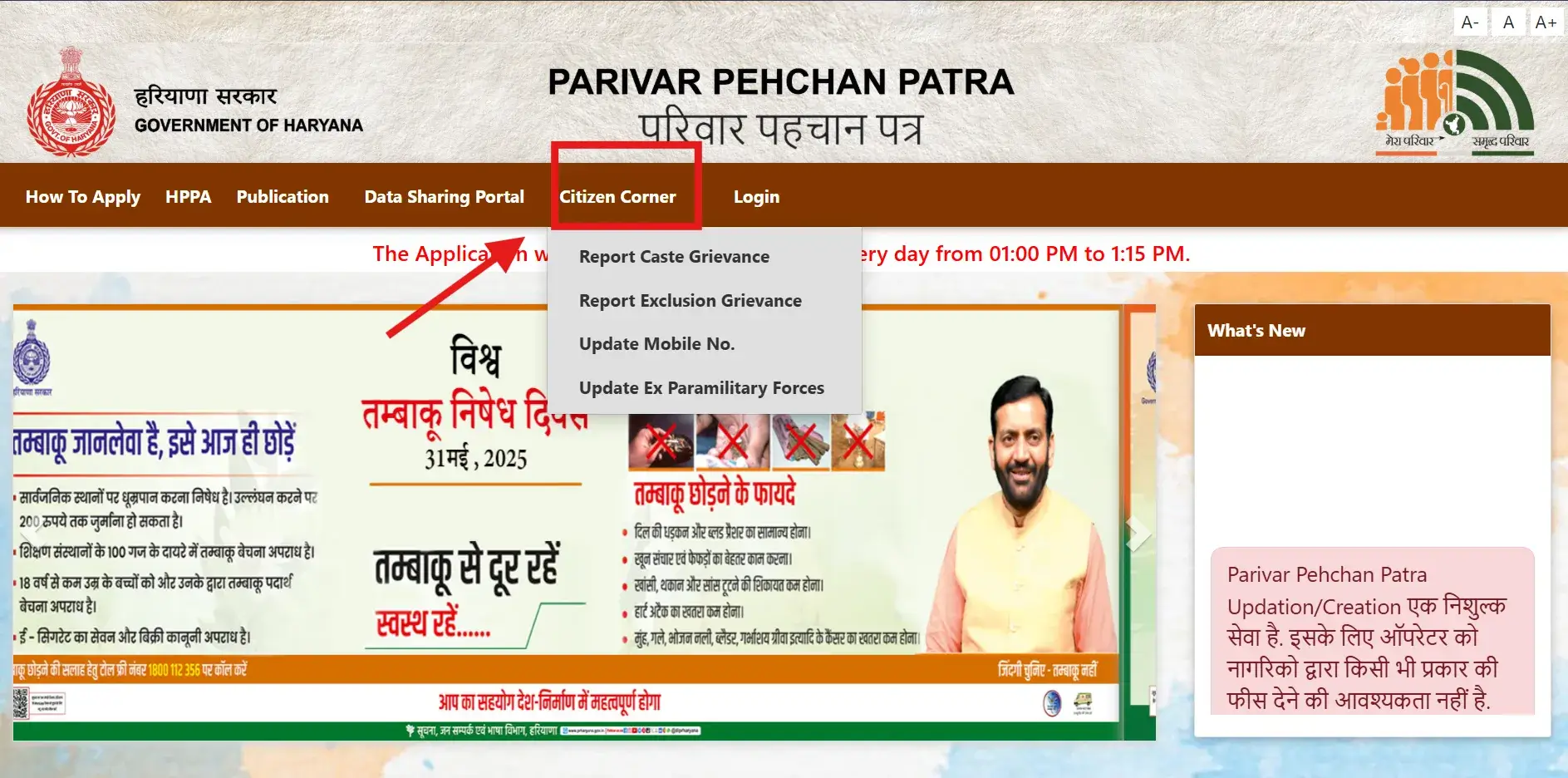
Step 3: Select Update Family Details
From the dropdown menu, choose Update Family Details.
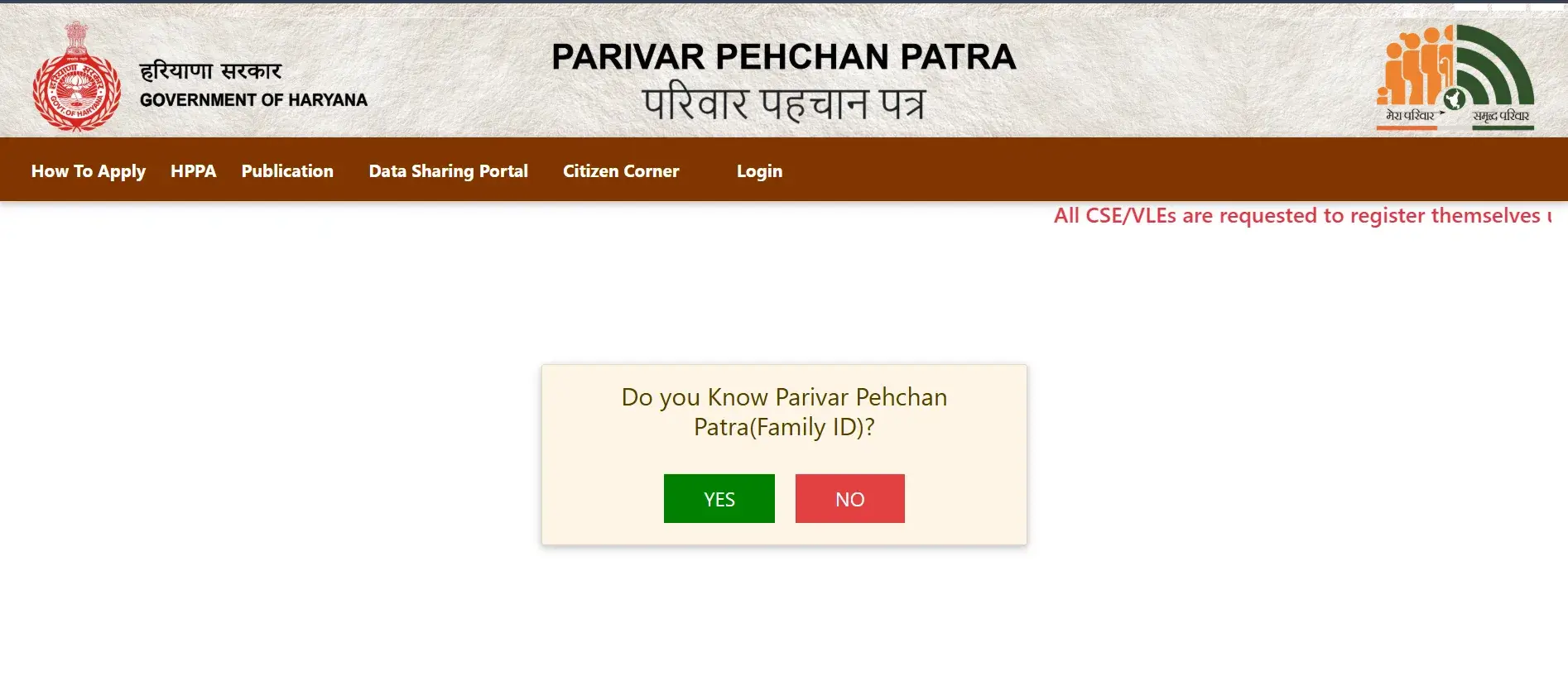
Step 4: Answer the Family ID Question
The portal asks: “Do you know Parivar Pehchan Patra (Family ID)?”
- If you have your 8-digit number, select Yes and enter it
- If you do not know your number, select No, enter the 12-digit Aadhaar number of the Head of Family, and click Search
Step 5: Select the Family Member
Pick the registered member from the dropdown list. The system sends the OTP to their linked mobile number.
Step 6: Enter OTP and Captcha
Check the registered mobile for the 4-digit OTP. Type it in the box, enter the security captcha, and click Verify OTP.
Step 7: View the Dashboard
Your complete family profile appears on screen. You can review members, check verified income brackets, and download certificates.
Login safety: Always log out after your session. Never share your OTP with anyone, even if they claim to represent a government office.
What are the Steps to Register for a New Haryana Family ID?
New households can enroll online or through an assisted government centre.
Method 1: Self-Registration Through the Citizen Portal
Step 1: Visit the Website
Open https://ppp-office.haryana.gov.in/.
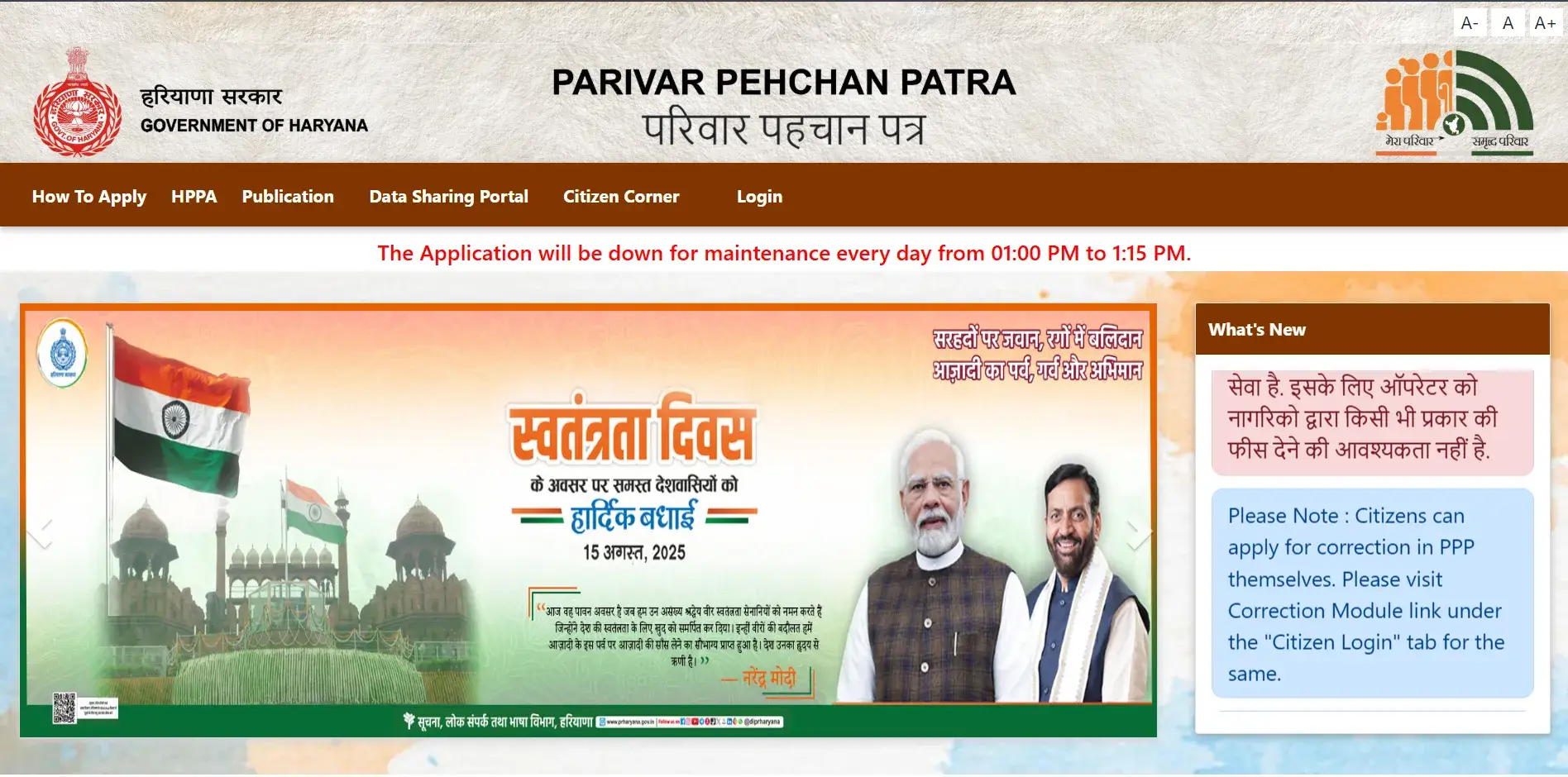
Step 2: Choose New Registration
Click Citizen Login and select the option to register a new family.
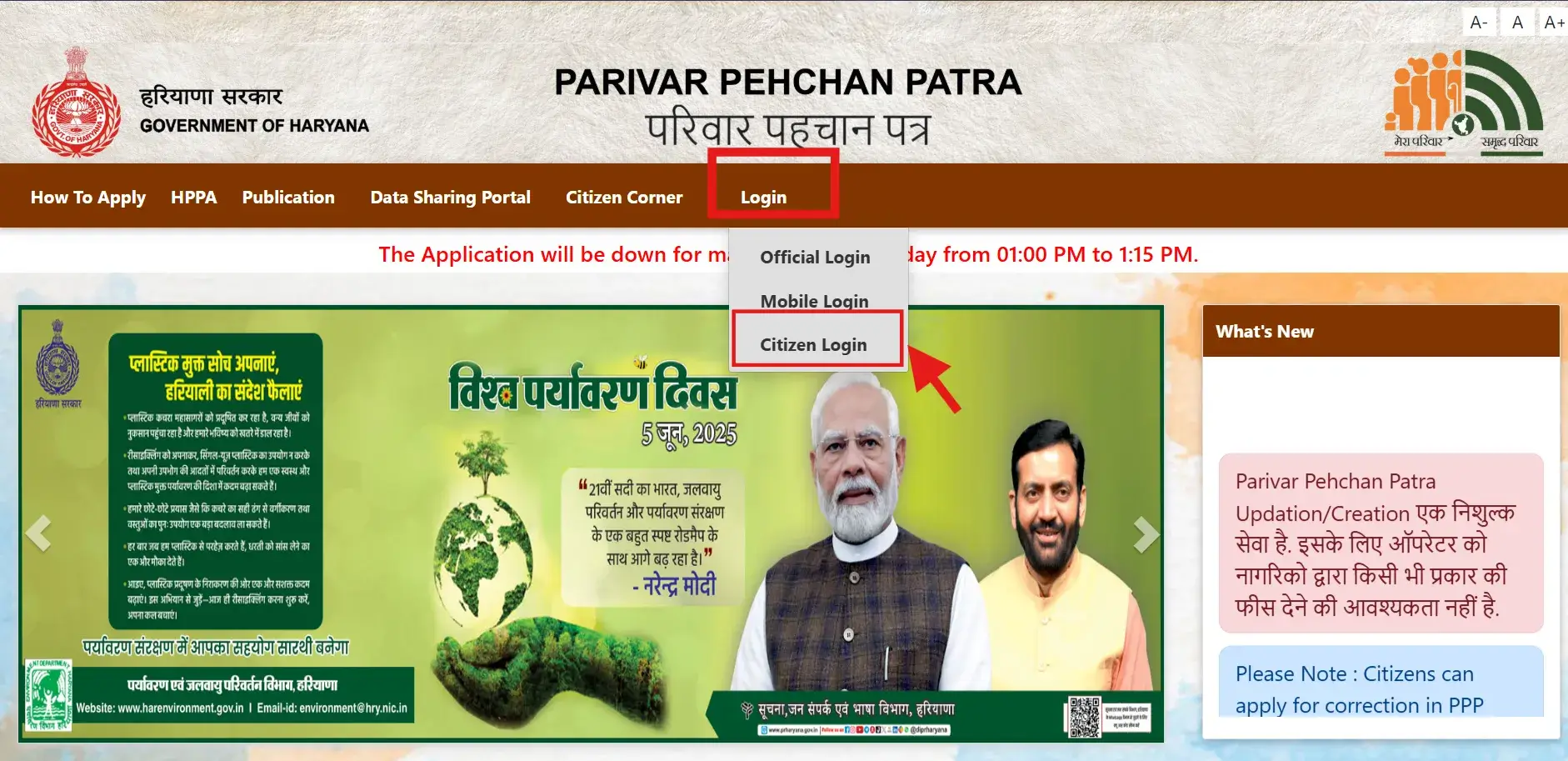
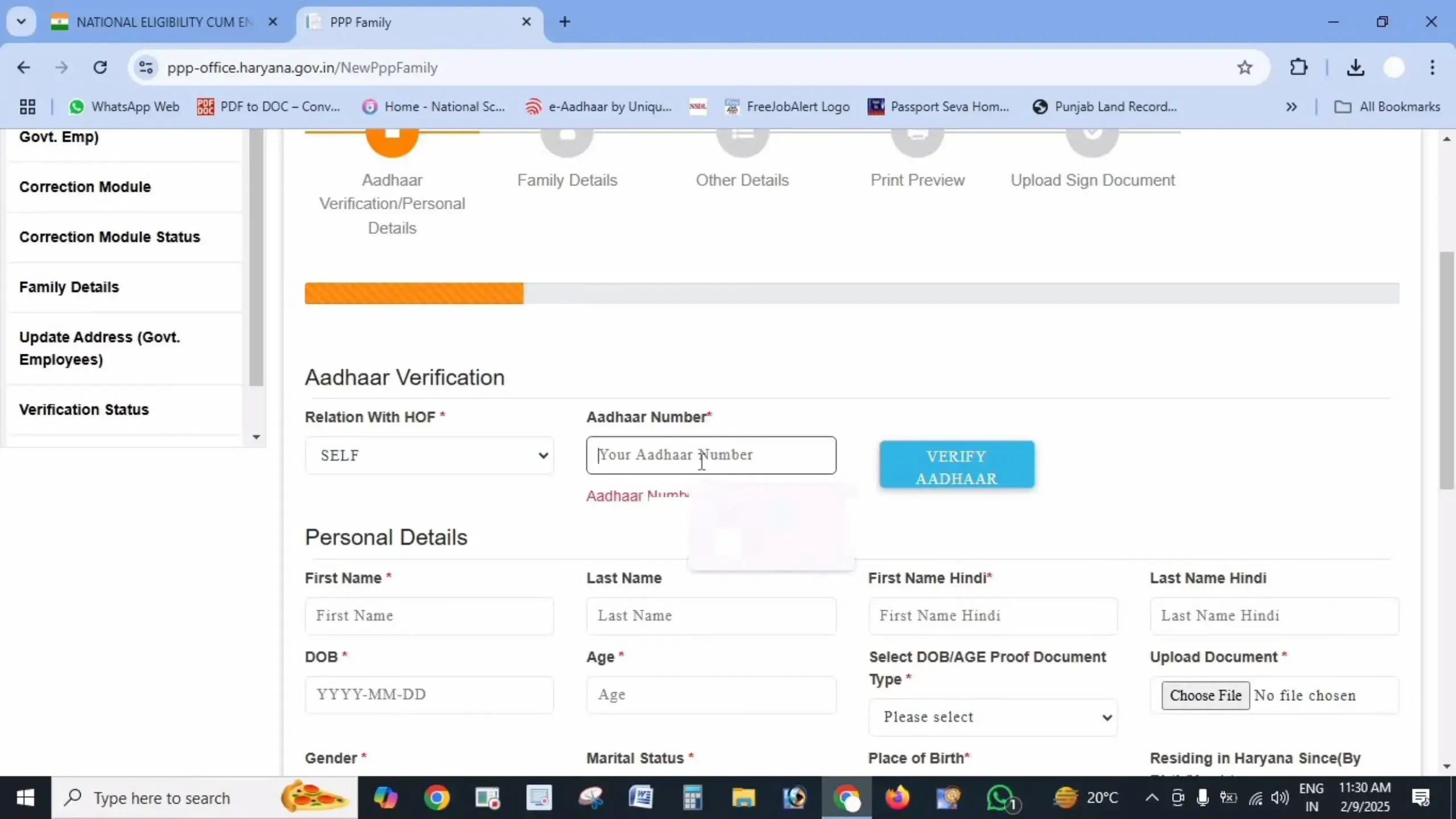
Step 3: Enter Aadhaar Number
Enter the Aadhaar number of the Head of Family. The system sends an OTP to the mobile registered with UIDAI.
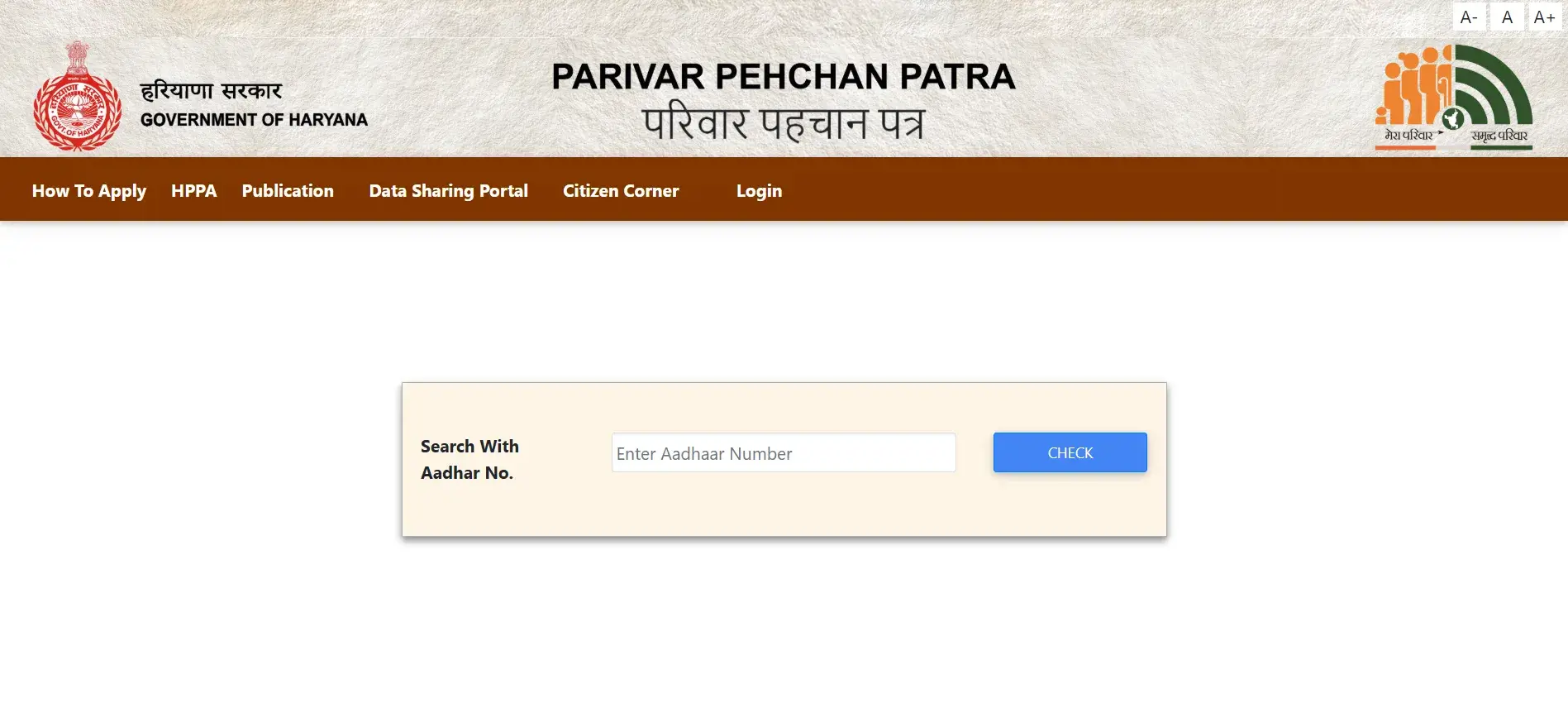
Step 4: Verify OTP
Enter the OTP received and click Verify.
Step 5: Fill Personal Details
Some details from Aadhaar fill in automatically. Add the remaining information:
- Full legal name in English and Hindi
- Date of birth and proof document
- Document issue date and number
- Gender and marital status
- Place of birth (inside or outside Haryana, with district or town)
- Duration of residence in Haryana
- Active mobile number (required)
- Email ID (optional)
- Social category with proof if SC/ST/OBC
- Disability status with percentage if applicable
- Voter ID details if available
- PAN card details if available
- Annual income and employment sector
Step 6: Upload Documents
Upload clear PDF copies under 200 KB each:
- Aadhaar cards for all members
- Age proof (matriculation certificate, birth certificate)
- Voter ID for adults
- Address proof (electricity bill)
- Income or caste proof
- Bank passbook or statement
- PAN card
Step 7: Add Family Details
Enter information for each household member:
- Father’s details (alive or deceased, Aadhaar, name in English and Hindi)
- Mother’s details (Aadhaar, name in English and Hindi)
- Spouse’s details (if applicable, with alive/deceased status)
- Address (house number, street, district, block, Property ID, ownership status)
- Other members like children with Aadhaar, name, and date of birth
Step 8: Review and Submit
Check all details on the preview screen. Click Submit once everything is correct.
Step 9: Save the Temporary ID
The system generates a temporary Family ID starting with “T”. Note it down or take a screenshot for tracking.
Method 2: Assisted Registration via CSC or SARAL Kendra
Visit a Common Service Centre (CSC) or district Antyodaya SARAL Kendra if you face technical issues. A Village Level Entrepreneur (VLE) scans documents, enters details, and submits the application through the administrative interface.
Government-approved service charges typically range from ₹30 to ₹50.
How to Update PPP Haryana Family ID?
A common mistake is skipping the physical signature step. Without it, your update stays stuck in “Draft” status.
Step 1: Log In
Use your Family ID and OTP to access Citizen Corner on https://meraparivar.haryana.gov.in/.
Step 2: Open the Correction Module
Select Correction Module or Update Family Details.
Step 3: Choose the Update Type
Pick the member and the field you want to change:
- Add New Member – For births or marriages. Needs Aadhaar and birth/marriage certificate
- Delete Member – For deceased members (death certificate required) or married daughters moving out
- Update Personal Details – Change name, education, or occupation
- Update Address – Needs updated electricity bill or property document
- Update Mobile Number – Verify with OTP
- Update Bank Details – For Direct Benefit Transfer payments
Step 4: Enter Corrected Information
Fill in the new details and upload supporting documents in PDF format under 200 KB.
Step 5: Print and Sign the Summary Form
Click Submit, then click Print Draft / Summary Form. Print the sheet on paper. The Head of Family must sign it in ink.
Step 6: Upload the Signed Copy
Scan the signed sheet as a PDF under 200 KB and upload it back to the portal.
Step 7: Final OTP Verification
Enter the OTP sent to your registered mobile. Your update request moves to the verification queue.
Step 8: Track the Status
Use your reference number to check the update status online.
How to Check Haryana Application and Verification Status?
Track your registration or correction request through the Mera Parivar portal.
Step 1: Visit Mera Parivar
Go to https://meraparivar.haryana.gov.in/.
Step 2: Click Status Check
Find Track Application Status on the home page.
Step 3: Enter Your Details
Type your 8-digit Family ID, temporary acknowledgment number, or registered mobile number.
Step 4: Enter the Captcha
Type the captcha characters shown and click Check Status.
Step 5: View the Status
The portal displays one of four stages:
| Status | What It Means | Next Step |
| Pending / In Progress | Documents awaiting review by the field committee | Wait; check back in 7-10 days |
| Under Field Verification | Local Committee validating income or residency | Wait for completion |
| Approved | Verification complete | Download your Family ID |
| Rejected | Application denied | Read the reason, correct errors, resubmit |
If your status shows “Pending” beyond 30 days, visit your nearest Saral Kendra.
Steps to Download and Print the Haryana Family ID Card
After approval, download your digital copy with the CRID validation QR code.
Step 1: Open Citizen Corner
Visit https://meraparivar.haryana.gov.in/ and click Citizen Corner.
Step 2: Select the Download Option
Click Family ID Print Form or Download Family ID.
Step 3: Enter Family ID
Type your 8-digit PPP ID and click Send OTP.
Step 4: Verify OTP
Enter the OTP received on your registered mobile.
Step 5: Download the PDF
A high-resolution PDF of your Parivar Pehchan Patra appears. Click Print or Download PDF to save it.
How to Resolve Common PPP Haryana Family ID Problems?
Disputing Incorrect Income Brackets
State welfare benefits depend on verified household earnings. The Government of Haryana uses five-member Local Committees (teachers, local officials, and volunteers) to assess family income.
Families with verified annual earnings below ₹1,80,000 qualify for Antyodaya BPL ration cards and free medical coverage under Ayushman Bharat Chirayu Haryana.
If your income is recorded too high due to a data error:
Step 1: Open the Grievance Module
Log in to https://meraparivar.haryana.gov.in/ and open the Grievance section.
Step 2: Select Income Grievance
Choose the member whose tagged income is incorrect.
Step 3: Enter Actual Income
Type your real household annual income.
Step 4: Upload Financial Proof
Add supporting documents like salary certificate, labour diary, bank statement, or income affidavit.
Step 5: Submit the Grievance
A designated Sector Committee conducts re-verification within 15 to 30 days.
Rules for Splitting or Merging Family IDs
Splitting a Family ID: Permitted when adult children marry or establish independent households. You must show proof of a separate living unit, such as an independent electricity meter connection or a distinct municipal Property ID.
Merging Family IDs: Used when a newly married person moves into their spouse’s household. Use the Transfer Member tool in the Correction Module, enter the person’s existing Family ID, verify with OTP, and confirm the transfer.
Lost or Inactive Registered Mobile Numbers
Every login requires an OTP. Losing your registered phone blocks online access. You cannot update a mobile number online without access to the old SIM.
Step 1: Visit the ADC Office or Saral Kendra
Go to your district Additional Deputy Commissioner (ADC) Office or an authorized Antyodaya SARAL Kendra.
Step 2: Request a Biometric Update
Ask for a contact number update using biometric authentication.
Step 3: Complete Aadhaar Verification
The operator scans the Head of Family’s fingerprint or iris through Aadhaar authentication.
Step 4: Register the New Number
Your new active phone number is saved directly in the CRID database.
Key Benefits Linked to Your Verified PPP ID
An active, accurate Family ID gives your household automatic access to state assistance programs:
- Antyodaya BPL Ration Cards – Families with verified income up to ₹1,80,000 receive digital Yellow or Pink ration cards
- Ayushman Bharat – Chirayu Haryana – Free cashless health insurance cover up to ₹5,00,000 per family per year at empanelled hospitals
- Old Age Samman Allowance – The Social Justice Department initiates pension enrollment automatically when a registered resident turns 60 and meets income requirements
- Post-Matric & Merit Scholarships – Direct disbursement of state student stipends into verified bank accounts
- Subsidized Utility & Solar Connections – Streamlined access to agricultural connections and subsidized PM Surya Ghar rooftop solar installations
Official Helpdesk and Support Channels
Contact official support if your application remains pending past 30 days:
- CRID State Toll-Free Helpline: 1800-2000-023 (Monday to Saturday, 9:00 AM to 6:00 PM)
- In-Person Escalation: Visit the CRID Help Desk at your district Mini Secretariat (ADC Office) or Sub-Divisional Magistrate (SDM) complex
Conclusion
The Parivar Pehchan Patra simplifies how Haryana residents access government welfare schemes. Keeping your family records current prevents unexpected benefit cancellations.
Before submitting any update, verify that all family members’ Aadhaar details match your PPP record, ensure your mobile number is active, and always upload the physically signed verification sheet after online corrections.
The system’s automatic linkage to birth, death, and marriage records keeps your profile updated with major life events. For everything else, the online portal handles corrections, status checks, and downloads without office visits.
Frequently Asked Questions
Clear, factual answers to common queries regarding Haryana Parivar Pehchan Patra (PPP) registration, updates, and verification.
1. Who can apply for a Haryana Family ID?
All permanent resident families in Haryana receive an 8-digit permanent Family ID. Non-residents who work, own property, or seek state benefits receive a 9-digit temporary ID starting with “T”.
2. Is there a fee for registering or updating a Family ID?
Online self-service through official government portals is free. Authorized Common Service Centres and SARAL Kendras charge ₹30 to ₹50 for document scanning and data entry.
3. How long does Family ID verification take?
New registrations and correction requests typically take 10 to 30 working days for Local and Sector Committee verification.
4. Why is my Family ID update stuck in “Draft” status?
Updates remain in draft until you print the summary sheet, obtain the Head of Family’s physical signature, scan the signed copy, and upload it with final OTP verification.
5. Can I split my Family ID after marriage?
Yes. Use the “Split Family” option in the portal. You need proof of an independent domestic unit, such as a separate electricity meter connection or Property ID.
6. What should I do if my annual family income is marked incorrectly?
Submit an Income Grievance through the Mera Parivar portal. Upload salary slips, bank statements, or an income affidavit for committee re-verification.
7. How do I change my registered mobile number if my old SIM is lost?
Visit a SARAL Kendra or district ADC office for biometric authentication using Aadhaar. Online mobile number changes require access to the old SIM.
8. Which income limit qualifies a family for a BPL Ration Card in Haryana?
Households with verified annual family income up to ₹1,80,000 are classified under the Below Poverty Line category.
9. What file format and size are accepted for document uploads?
All supporting documents must be in PDF format only, with each file under 200 KB.
10. Does a newly born child get added to the Family ID automatically?
If the birth is registered through the Haryana Civil Registration System with a parent’s Family ID, the child links automatically. Otherwise, add the newborn manually using the birth certificate.
11. Can a single individual have two different Family IDs?
No. Every individual’s record ties directly to their unique 12-digit Aadhaar number. The central database flags and blocks duplicate entries.
12. How do I know if my Family ID is officially approved?
Check your status on the Mera Parivar portal using your 8-digit ID or application reference number. Once the status shows “Approved,” download your official card with its validation QR code.