One unrecorded birth or an uncorrected death on your PPP Haryana Family ID can quietly block a pension, a ration card, or a health cover decision. The Chirayu Ayushman tiers are already active—the ₹1,500 slab since 2023 and the ₹4,000/₹5,000 slabs since November 1, 2026—so the income figure sitting on your Family ID is being read against live boundaries right now.
Quick Answer : The PPP Haryana Family lifecycle covers every household change—births, marriages, deaths, separations, address shifts, and bank updates.Newborns enter through “Add Member,” adult spouses through Split/Merge. The Chirayu Ayushman tier structure is an established policy, not a new launch: the ₹1,500 slab has run since August 2023, and the ₹4,000/₹5,000 tiers took effect on November 1, 2026, as the latest phase of an ongoing system.
Why Household Changes Matter on the PPP Haryana Family Record
The Parivar Pehchan Patra is a living household registry, not a one-time certificate.
The Citizen Resources Information Department (CRID) assigns every family an 8-digit ID and stores the family’s structure, residential details, and social and economic information on that single record.When the household changes, the record must change with it.
The stakes are practical. Haryana links the Family ID to pensions, subsidies, scholarships, and health scheme eligibility, and the database decides who qualifies for each programme.
A mismatch between the real household and the digital record can delay approvals, trigger rejection flags, or cut off a benefit a family genuinely deserves. You can check official updates on the CRID portal.
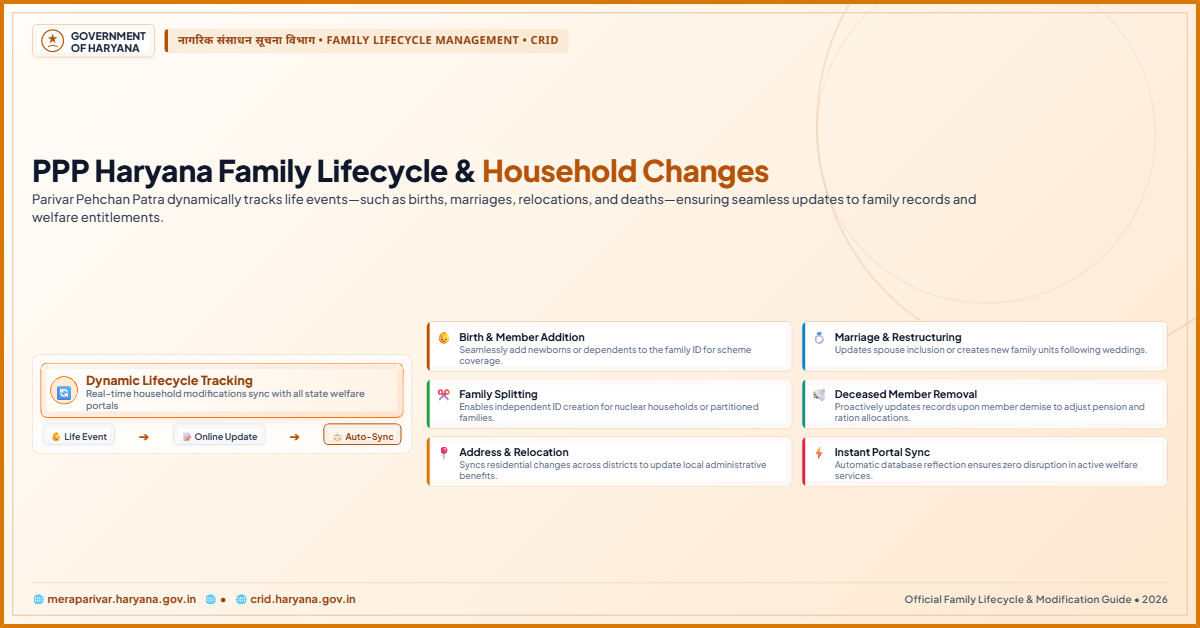
One design feature helps. The Family ID is linked to birth, death, and marriage records so these events can flow into the database automatically. Automatic linkage is useful but not a guarantee. Families should verify the change appears correctly and complete a manual update when the system misses it.
The Main Types of Household Changes on PPP Haryana
Every household moves through stages, and each stage has a separate update path inside the portal. Choosing the right option prevents rejection and saves a trip to a service centre.
Adding a Newborn: The Only Direct “Add Member” Route
A birth expands the family unit, and this is the one case where the “Add Member” option works from scratch.
The newborn does not yet exist in the PPP database, so the form creates a fresh member entry under the existing Family ID.
The head of the family, or an authorised member, enters the child’s name, date of birth, gender, and relationship with the family head. Aadhaar details are entered if the child already has one.
The birth certificate from the hospital or municipal body is the core proof. An SMS alert goes to the registered mobile number of the head when the addition is made, and the head’s consent is mandatory before the newborn joins the Family ID.
Adding an Adult Spouse: Split/Merge, Not “Add Member”
This is where many families go wrong. A spouse is an adult who already exists on another Family ID—usually the parental household. The basic “Add Member” form is strictly reserved for newborns. It cannot pull an adult from another family record.
To add a spouse, the family must use the Split/Merge Family module. The adult’s record is imported from their previous household ID into the new household, so the same Aadhaar identity is not duplicated across two Family IDs.
Duplicate records cause split family data, rejected scheme applications, and a lengthy merge process to repair the damage. In practice, the couple either splits a new Family ID from the husband’s parental household and merges the bride’s record into it, or merges two existing records where a separate ID already exists.
The marriage certificate supports the request, and the family head’s consent still applies.
Warning on Strategic Income Splitting: Do not use the Split/Merge module simply to separate family members to lower your collective Family ID income for a BPL ration card.
The CRID backend automatically cross-references your physical address and electricity utility meter number. If a split is attempted under the same meter number without a legal marriage certificate or property division deed, the portal flags it as a “Strategic Split” and permanently locks the modification profile.
Also note: single, unmarried adults living under the same roof cannot legally split into a separate ID under the current backend engine.
Removing a Member After Death or Separation
When a member passes away or permanently leaves the household, the record must be corrected. The “Remove Member” option requires a death certificate for a death case or a divorce decree for a separation case.
Leaving a deceased or separated member on the Family ID is not a harmless oversight.
Haryana has flagged that Family IDs can face cancellation consequences when family composition no longer reflects reality. The state has also upgraded its “Delete Unwanted Member” module, which lets citizens request removal of unknown or wrongly added individuals online.
The citizen selects the PPP ID, verifies an OTP sent to the family head’s mobile number, and the request goes to the concerned Additional Deputy Commissioner (ADC) for approval.
While a formal divorce decree is the standard document for separation cases, the state has cleared a vital exception for abandoned or separated women.
If a legal divorce is pending, a dependency certificate issued by the local District Women & Child Development officer can be uploaded to the portal, allowing the ADC to manually un-link the woman’s Aadhaar from the former household.
Correcting Personal Details
Education levels, occupation, marital status, and name spellings change over time. These fields sit inside the individual member profile and are handled through the “Update Personal Details” section.
An educational certificate supports an education update, an employment letter or ID card supports an occupation update, and a marriage certificate supports a marital status change.
Name corrections deserve special care. A spelling mismatch between the Family ID and Aadhaar can cause rejections in scheme applications and in separate state portals that pull PPP data.
Correcting the spelling early is easier than fixing a rejected benefit application later.
Changing Address After Shifting House
When a family moves to a new house, the address field must be updated with the new house number, street, block, and district.
Accepted address proof includes an electricity bill or water bill for the new residence, a rent agreement, or property ownership documents.
An address mismatch can affect local service delivery and field verification, so the document should clearly connect the family to the new location.
Updating Mobile Number and Bank Details
The registered mobile number is the gateway to every OTP-based action on the Family ID. If that number goes inactive, updates stall.
Bank details matter because welfare money moves through Direct Benefit Transfer (DBT). The “Update Bank Details” option records the account number, IFSC code, and bank name, supported by a cancelled cheque or the first page of the passbook.
| Update Type | Core Document Needed | Where to Apply |
|---|---|---|
| Add newborn | Birth certificate; child’s Aadhaar if issued | Portal “Add Member” or CSC/Saral Kendra |
| Add spouse (adult) | Marriage certificate; previous Family ID of spouse | Split/Merge Family module or Kendra |
| Remove deceased member | Death certificate | Portal; ADC approval for disputed deletions |
| Remove separated member | Divorce decree, OR dependency certificate from District Women & Child Development officer if divorce is pending | Portal; ADC manually un-links Aadhaar |
| Correct name spelling | Aadhaar or supporting identity proof | Portal (OTP) or Kendra |
| Update education or occupation | Certificate or employment letter | Portal or Kendra |
| Change address | Electricity bill, rent deed, or ownership proof | Portal or Kendra |
| Update mobile number | Active Aadhaar-linked mobile | Portal via Aadhaar OTP; Aadhaar Seva Kendra if number is dead |
| Update bank details | Cancelled cheque or passbook first page | Portal or Kendra |
Step-by-Step Guide to Updating Household Details on PPP Haryana
Follow this sequence for a self-update on the Mera Parivar portal. The same broad steps apply at a CSC or Saral Kendra, where an operator performs them on the citizen’s behalf.
Step 1: Open the official Mera Parivar portal.
Go to the “Update Family Details” tab maintained by CRID. Self-update mode is only for existing Family IDs.
Step 2: Log in with your 8-digit Family ID.
Enter the ID and complete OTP verification on the head’s registered mobile. The OTP confirms the person making the change.
Step 3: Select the correct update channel.
Use “Add Member” only for a newborn. Use “Split/Merge Family” for an adult spouse or an adult moving between households.
Step 4: Enter new information and upload documents.
Fill every field carefully and attach proof in the required format. Clear, readable files reduce rejection risk.
Step 5: Submit and complete OTP verification.
Review the form before submitting. A single spelling error can mismatch Aadhaar and delay approval.
Step 6: Save the reference number and track the request.
The reference number checks update status. The official administrative SLA is now a flat 7 working days.
The Chirayu Ayushman Tiers: An Established System, Not a New Launch
The multi-tier Chirayu structure is not a recent invention. The ₹1.80 lakh to ₹3 lakh slab at ₹1,500 per family per year has been running since August 15, 2023.
The ₹3 lakh to ₹6 lakh slab at ₹4,000 and the above-₹6 lakh slab at ₹5,000 represent the latest phase of an ongoing expansion that took effect on November 1, 2026, for the policy period running to October 31, 2027.
What this means for household changes is straightforward. The income you record on the Family ID is read against the active tier boundaries, not against legacy rules.
If a marriage brings in a new earner, or a death removes one, the verified income band can shift, and the Chirayu portal will sort the family into a different slab on its next read.
The November 1 date marked the activation of the higher slabs, not the creation of the system.
New Rules Reshaping PPP Haryana Household Updates in 2026
Three procedural changes now shape how household updates work. First, SMS alerts go to the registered mobile number when an enrolment ID is created, when a Family ID is generated, and when a new member is added.
Second, the family head’s consent is mandatory before any new member joins the Family ID.
The rule addresses unauthorised additions and accidental wrong entries, giving the head control over who counts as part of the household.
Third, the Split/Merge discipline is now enforced. The “Add Member” form no longer accepts an adult who already exists on another Family ID.
Adult additions must flow through the Split/Merge module so Aadhaar identity stays unique across the database.
The upgraded “Delete Unwanted Member” module also allows online removal of wrongly added individuals, with OTP verification and ADC-level approval.
The Chirayu tiers described above are the established policy governing the portal today. The November 1, 2026 activation of the ₹4,000 and ₹5,000 slabs is the current phase of that policy, not a new scheme.
Common Problems and How to Solve Them
Not every update goes smoothly. Most problems fall into a few predictable patterns.
The OTP does not arrive because the registered mobile is dead. Local CSC operators can no longer manually bypass a dead registered mobile number.
The correct route is to update the mobile number in the Aadhaar card first at an Aadhaar Seva Kendra. Once Aadhaar carries the active number, the PPP portal pulls that number automatically through an Aadhaar OTP check linked to the UIDAI database.
A verified field is locked. Some identity fields lock after initial validation. Unlocking them may require a physical request or an assisted update at a Kendra.
The update is rejected for a document mismatch. Rejection reasons are usually visible on the portal. Common causes are unclear files, a name mismatch with Aadhaar, or a document that does not prove the claimed change.
The spouse could not be added through “Add Member.” This is expected. The spouse already exists on another Family ID. Use the Split/Merge Family module instead.
The family head designation is wrong. If the head has died or permanently separated, the designation must be corrected through an authorised operator or a formal request, supported by documentary proof.
What if the Head of Family passes away?
If the family head dies, the profile enters a temporary deadlock because you cannot access the OTP required to file a regular “Remove Member” request. A surviving adult member must visit a Saral Kendra with the physical death certificate and the family’s ration card/identity proofs. The operator initiates the specialized Deceased Head Migration protocol, and once approved by the local ADC, the “Head” status and phone number shift to the next eldest member, unlocking the dashboard.
Conclusion
The PPP Haryana Family record is the single point through which births, marriages, deaths, separations, address shifts, mobile number changes, and bank detail updates reach the state welfare system.
The rules now separate the channels: “Add Member” handles newborns only, while adult spouses and dependants move through Split/Merge. A dead mobile number cannot be bypassed at a Kendra; it must be fixed in Aadhaar first.
The Chirayu Ayushman tiers are an established, ongoing policy—the ₹1,500 slab since August 2023 and the ₹4,000/₹5,000 slabs active from November 1, 2026—and the PPP portal’s role is limited to pushing the verified income figure to the separate Chirayu platform.
The SLA is a flat 7 working days, and a legal exception protects separated women whose divorce is still pending. Families that use the right channel the first time keep their benefits aligned with their real household.
Frequently Asked Questions
1. What is a PPP Haryana Family ID?
It is an 8-digit unique number issued to a family residing in Haryana. It stores household structure, address, and social and economic details for scheme delivery.
2. Can I add a newborn to the Family ID online?
Yes. The “Add Member” option is designed for newborns. Use the Mera Parivar portal with the birth certificate and the child’s Aadhaar details if available.
3. Can I add my spouse using the “Add Member” option?
No. “Add Member” is reserved for newborns who do not exist in the database. An adult spouse must be imported through the Split/Merge Family module to prevent duplicates.
4. Why is the Split/Merge route required for a spouse?
Because the spouse already has an Aadhaar-linked record on another Family ID. Importing that record keeps one identity mapped to one family and avoids duplicate-record problems.
5. Is the family head’s consent required to add a new member?
Yes. New rules require the head’s approval before a member joins the Family ID, and an SMS alert goes to the registered mobile number when an addition happens.
6. How do I remove a deceased family member from the Family ID?
Use the “Remove Member” option and upload the death certificate. The change is recorded after verification.
7. My registered mobile number is dead. Can a CSC operator bypass it?
No. CSC operators can no longer bypass a dead registered mobile number. Update the number in your Aadhaar card at an Aadhaar Seva Kendra, and the PPP portal pulls it automatically via a UIDAI-linked Aadhaar OTP check.
8. How do I update bank details for DBT benefits?
Use the “Update Bank Details” option and upload a cancelled cheque or the first page of the passbook with the correct account number and IFSC code.
9. How long does a PPP update take?
The official SLA is a flat 7 working days for database updates and disputes. Fast-track Gram Sabha village camps compressed the earlier window.
10. What if the Head of Family passes away and the OTP cannot be accessed?
A surviving adult member must visit a Saral Kendra with the death certificate and family identity proofs. The operator starts the Deceased Head Migration protocol, and after ADC approval the head status and phone number shift to the next eldest member, unlocking the dashboard.
11. Did the Chirayu Ayushman expansion launch on November 1, 2026?
The system itself is older. The ₹1,500 slab for incomes between ₹1.80 lakh and ₹3 lakh has run since August 15, 2023. The expansion to the ₹4,000 slab (₹3 lakh to ₹6 lakh) and the ₹5,000 slab (above ₹6 lakh) took effect on November 1, 2026, as the latest phase of an ongoing policy.
12. Does the Mera Parivar portal calculate my Chirayu premium?
No. Mera Parivar only hosts the verified income figure. Enrollment and premium calculation happen on the separate health department platform at chirayuayushmanharyana.in. The PPP backend pushes the verified income band to that portal through an API link.